
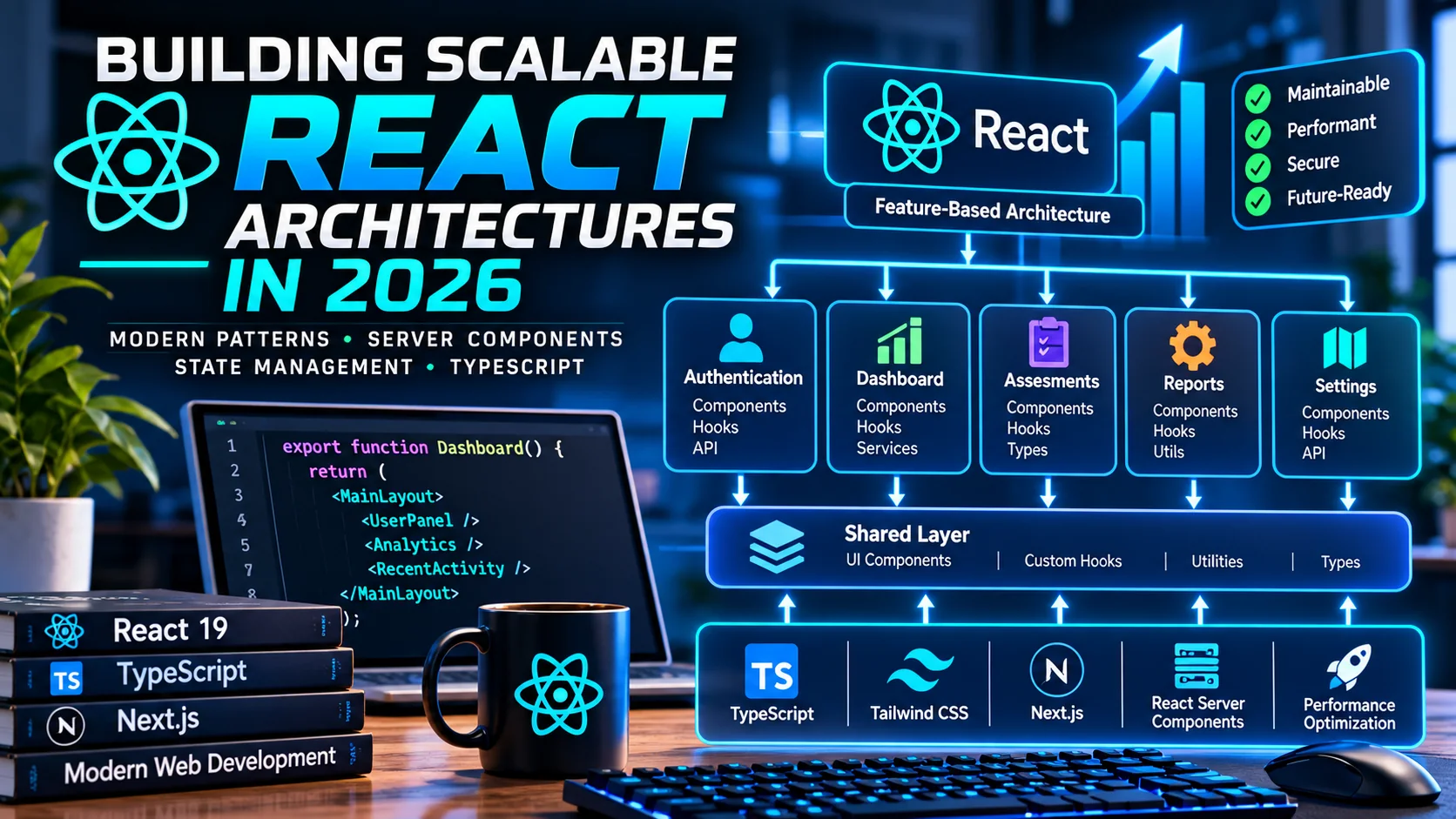
Originally published February 26, 2026 | Updated October 11, 2026
React has come a long way from being a simple library for building interactive user interfaces.
Today, React powers everything from lightweight website components to complex dashboards, enterprise applications, SaaS platforms, and AI-driven interfaces.
But as applications grow, one of the biggest challenges isn’t writing individual components.
It’s designing an architecture that remains maintainable, performant, secure, and understandable as the codebase evolves.
I’ve worked on projects ranging from custom WordPress applications to interactive PWAs and AI-powered tools, and one lesson continues to stand out:
A scalable React application isn’t defined by how many components it contains. It’s defined by how easily those components can evolve without breaking the rest of the system.
In this guide, I’ll explore practical architectural strategies for React development in 2026, including feature-based organization, React Server Components, state management, TypeScript, performance optimization, testing, and AI-assisted development.
What Does Scalable React Architecture Actually Mean?
When developers discuss scalability, they often focus on performance.
Can the application handle more users? Can it render large datasets? Can it support additional features without slowing down?
Those are important questions.
But scalable architecture also includes the ability to maintain and extend the application over time.
A well-structured React application should support:
- Maintainability: Developers can understand and modify features without navigating unrelated code.
- Extensibility: New functionality can be introduced without major architectural changes.
- Performance: The application avoids unnecessary computation and excessive client-side JavaScript.
- Testability: Components and business logic can be tested independently.
- Collaboration: Multiple developers can work on separate areas of the application without constantly creating conflicts.
- Security: Sensitive operations and data access remain appropriately protected.
- Developer productivity: The architecture reduces unnecessary boilerplate and repetitive work.
Scalability isn’t achieved through one framework or folder structure.
It comes from making sound architectural decisions consistently.
1. Organize React Applications Around Features
One of the most common mistakes in growing React projects is organizing everything exclusively by file type.
An early project might contain folders named:
components/
hooks/
services/
utils/
This structure can work well for small applications.
But when the project grows to hundreds of components, locating the files associated with one feature becomes increasingly difficult.
For larger applications, I prefer a feature-based approach.
Instead of grouping everything by technical category, related components, hooks, API logic, and tests are organized around the functionality they support.
For example, a restaurant training application might have separate areas for employee profiles, training modules, assessments, and manager reports.
Each feature can contain its own implementation details while exposing clearly defined interfaces to the rest of the application.
This makes the application easier to understand and allows developers to work on individual features with fewer unintended dependencies.
The Importance of Clear Boundaries
Feature-based organization only works when boundaries are respected.
If every feature can import deeply into every other feature’s internal files, the folder structure provides little protection.
A stronger approach is to expose a small public interface for each feature and keep internal implementation details private.
This makes refactoring easier because other parts of the application depend on stable interfaces rather than the feature’s internal structure.
2. Understand React Server Components
One of the most significant architectural developments in modern React is the introduction of React Server Components.
Server Components allow parts of a React application to render outside the browser.
They can access server-side resources and prepare UI output without shipping their component implementation to the client.
This can be particularly valuable for applications that display substantial amounts of data but don’t require every element to be interactive.
For example, imagine building an administrative dashboard.
The dashboard might contain a list of employees, training completion statistics, and recent assessment results.
Much of that information could be retrieved and rendered on the server.
Interactive elements, such as filters, editable forms, and buttons, can remain Client Components.
Server Components vs. Client Components
Server Components are useful for:
- Accessing server-side data sources
- Rendering noninteractive content
- Reducing unnecessary browser JavaScript
- Keeping server-only dependencies out of client bundles
Client Components are appropriate when the interface requires:
- Event handlers
- Browser APIs
- Interactive state
- Effects and user-driven updates
The objective is not to eliminate client-side React.
It’s to place rendering and computation in the environments where they make the most sense.
React Server Components require appropriate framework and bundler support. Frameworks such as Next.js provide an established way to work with them.
3. Choose a Framework Based on Application Requirements
Not every React application needs the same infrastructure.
A browser-based internal tool may have different requirements from a public-facing website, a SaaS platform, or an e-commerce application.
For a highly interactive application that doesn’t depend heavily on server-rendered content, a React application built with Vite may be an effective choice.
For applications that benefit from server rendering, Server Components, integrated routing, and server-side data access, a framework such as Next.js may be more appropriate.
The decision should be based on the application’s functional and operational needs.
Before selecting an approach, consider:
- Does the application need search-engine visibility?
- Will users access substantial amounts of dynamic data?
- Does the application require server-side authentication?
- Is offline functionality important?
- Will the frontend communicate with an existing backend?
- How will the application be deployed and maintained?
For example, a React PWA connected to a WordPress REST API may benefit from a different architecture than a standalone full-stack TypeScript application.
Choosing the right foundation early can prevent unnecessary complexity later.
4. Use TypeScript to Strengthen Component Contracts
TypeScript has become one of my preferred tools for building maintainable JavaScript applications.
Its type system helps developers identify certain classes of errors during development rather than discovering them only when the application runs.
As a React application grows, TypeScript can also serve as valuable documentation.
Typed component props communicate what a component expects.
Typed API responses describe the data an application consumes.
Shared interfaces make it easier to understand relationships between different systems.
However, TypeScript doesn’t automatically validate data received from external sources.
If a server returns malformed JSON, TypeScript alone won’t make that response safe.
For APIs and external data, runtime validation remains important.
Libraries such as Zod can complement TypeScript by checking incoming values against expected structures.
I see TypeScript as a way to create stronger contracts between application components, not as a substitute for testing or input validation.
5. Modern React State Management
State management is one of the most important architectural decisions in a growing React application.
It’s also one of the easiest areas to overcomplicate.
Not every application needs a global state library.
The first step is understanding what kind of state you’re managing.
Local Component State
State that belongs to one component should generally remain local.
For example, whether a modal is open or which tab is selected rarely needs to be managed globally.
React’s built-in hooks, including useState and useReducer, often provide everything necessary.
Shared Application State
Some values must be accessible across multiple components.
Examples include an active workspace selection, a user interface preference, or a multi-step workflow.
React Context can be useful for sharing appropriate values across a component tree.
For more complex scenarios, a dedicated state-management library may be worth considering.
Server State
Data retrieved from an API presents different challenges.
It may need caching, background refetching, invalidation, synchronization, and error handling.
For client-heavy applications, tools such as TanStack Query can simplify these responsibilities.
The important architectural principle is to avoid treating all data as the same kind of state.
Local UI state, shared client state, and server-managed data have different lifecycles and should be managed accordingly.
6. Avoid Unnecessary Global State
When applications become complex, it’s tempting to store everything in one centralized state container.
This can create a large network of dependencies where seemingly small changes trigger updates throughout the application.
Instead, I recommend keeping state as close as possible to the components that actually use it.
Only elevate state when multiple parts of the interface genuinely need to share it.
For particularly complex component behavior, reducers can provide a structured way to coordinate state transitions.
Combining reducers with Context can also be effective, although Context should be organized thoughtfully to avoid unnecessary updates.
The goal is predictable data flow, not simply selecting the most popular state-management library.
7. Build Reusable Components Without Overengineering
Reusable components are fundamental to React development.
But reuse can become counterproductive when developers attempt to make every component support every possible scenario.
A button component that accepts dozens of unrelated properties may eventually become harder to maintain than several focused components.
I prefer building reusable interfaces around clear responsibilities.
For example, an application might have shared form controls, navigation elements, status indicators, and layout primitives.
More specialized features can compose these shared elements into larger components.
This helps establish a consistent design system while preserving flexibility.
A scalable component library should make development easier.
It shouldn’t force developers to work around abstractions that are more complicated than the original problem.
8. Optimize Performance Where It Matters
React applications can encounter performance issues for many reasons.
Common examples include excessive rendering, expensive calculations, large JavaScript bundles, unnecessary network requests, and inefficient handling of extensive datasets.
But premature optimization can make code harder to understand without providing meaningful improvements.
I recommend measuring performance before introducing complex optimizations.
Code Splitting and Lazy Loading
Large applications often contain features that users don’t need immediately.
Loading every feature at startup can increase initial download and execution time.
Code splitting allows application code to be separated into smaller bundles.
Lazy loading can delay nonessential functionality until it’s required.
This can be useful for applications with multiple dashboards, administrative tools, or specialized interfaces.
Memoization
React provides tools such as useMemo and useCallback, as well as component memoization techniques.
These can help in specific situations, but they aren’t universal performance solutions.
Unnecessary memoization introduces complexity and can make code harder to read.
I prefer profiling the application first and applying optimization only where it provides measurable value.
Rendering Large Data Collections
Tables and lists containing thousands of entries can become expensive to render.
Virtualization can help by rendering only the portion of a collection currently needed on screen.
This is particularly useful in reporting dashboards, content-management interfaces, and applications with large datasets.
9. Design API Integration as a Separate Concern
Frontend components shouldn’t need to understand every detail of how backend services operate.
A scalable architecture benefits from separating data access from presentation.
For example, a React component displaying employee training progress shouldn’t need to know the exact details of the underlying database query.
Instead, the application can expose an appropriate data-access function, hook, or service that returns the information the component needs.
This becomes particularly important when integrating React with external systems.
For a WordPress-backed application, the frontend may retrieve information through the WordPress REST API.
For a full-stack TypeScript application, technologies such as tRPC may be useful.
Other applications may depend on GraphQL or conventional REST services.
Regardless of the technology, keeping backend communication behind clear interfaces makes the frontend easier to maintain and test.
10. Build Security into the Architecture
Security is particularly important when React applications handle account information, financial data, internal business records, or other sensitive information.
A well-designed frontend should never be responsible for enforcing critical authorization decisions.
Those decisions belong on trusted server infrastructure.
For example, hiding an administrative button doesn’t prevent someone from calling the underlying API directly.
The server must independently verify whether a user is authorized to perform an operation.
Other important considerations include secure authentication, appropriate session handling, output encoding, input validation, and safe management of secrets.
Environment variables exposed in a browser bundle should never contain private credentials.
And client-side type checking doesn’t replace server-side validation.
From a cybersecurity perspective, application architecture and security architecture need to work together from the beginning.
11. Testing Scalable React Applications
Testing becomes increasingly valuable as an application grows.
When dozens of features share components and infrastructure, a change in one area can introduce unexpected problems elsewhere.
A practical testing strategy should cover different levels of the application.
Unit tests: Validate isolated functions and business logic.
Component tests: Verify that user-interface components behave correctly.
Integration tests: Check that related systems work together as expected.
End-to-end tests: Exercise important workflows in a realistic application environment.
Tools such as Vitest, React Testing Library, and Playwright can support different aspects of this process.
Not every application needs exhaustive automated coverage from day one.
However, core business logic, authentication, permissions, and critical workflows should receive particular attention.
12. Use CI/CD to Maintain Quality
Automated testing becomes more useful when it is integrated into the development workflow.
Using GitHub Actions or another continuous integration system, teams can validate changes whenever pull requests are opened.
A pipeline might include TypeScript checking, linting, automated tests, production builds, and dependency reviews.
This provides feedback before code reaches the main branch.
For larger projects, deployment automation can also help establish consistency between staging and production environments.
I particularly value workflows that make each release traceable.
When something breaks, developers should be able to identify which change introduced the problem and how to restore a known-good version.
13. AI-Assisted React Development in 2026
AI coding assistants have become a useful part of modern software development.
They can help generate components, explain unfamiliar code, suggest tests, refactor modules, and investigate errors.
But they can also produce code that looks plausible while introducing unnecessary dependencies, fragile state management, or incorrect assumptions.
As a result, scalable architecture is arguably even more important when AI is involved.
Without clear structural guidelines, multiple AI-generated features can quickly produce an inconsistent codebase.
I recommend defining architectural conventions before relying heavily on AI-generated changes.
These should include:
- Agreed folder and feature boundaries
- Consistent TypeScript conventions
- Clear component responsibilities
- Defined data-access patterns
- Testing requirements
- Security expectations
- Pull-request and review procedures
AI can assist with implementation, but architectural consistency still requires deliberate oversight.
14. A Practical Architecture for a Growing React Application
For a medium-to-large React project, I would generally begin with a feature-oriented structure supported by a small set of shared application services.
The exact directory layout depends on the framework, but the principles remain similar.
The application should have a clear entry point and routing strategy.
Each major feature should own its components and business logic.
Shared UI primitives should remain separate from domain-specific features.
API integrations should be abstracted behind consistent interfaces.
Cross-cutting concerns such as authentication, permissions, logging, and error handling should be managed centrally where appropriate.
Tests should live near the features they validate or follow another consistent convention.
This structure provides room for the application to grow without immediately introducing the complexity of a monorepo or microservices architecture.
15. How I Apply These Principles to Real Projects
These architectural decisions become particularly relevant when developing custom applications for businesses.
Consider an employee training platform with separate modules for educational content, assessments, reporting, and management.
Each module may have different data requirements, interfaces, and permissions.
Organizing those features into clear boundaries makes it easier to develop and maintain them.
The same principles apply to client dashboards, inventory systems, interactive PWAs, and AI-enhanced business applications.
In a WordPress environment, I often favor keeping WordPress responsible for content management and server-side business rules while using React for interfaces that benefit from richer interaction.
That doesn’t mean every WordPress website needs React.
The technology should support the business problem rather than dictate the solution.
16. When Should You Refactor a React Application?
Refactoring should solve identifiable problems.
Common warning signs include components that have become difficult to understand, duplicated business logic, inconsistent state management, extensive cross-feature dependencies, and changes that repeatedly break unrelated functionality.
When these patterns emerge, reorganizing the architecture can be worthwhile.
But large rewrites introduce their own risks.
I generally prefer incremental improvements.
Establish a clear architectural direction, identify the most problematic dependencies, improve the test coverage, and gradually move functionality into better-defined components.
This approach reduces disruption while allowing the architecture to evolve.
Final Thoughts: Build for Change, Not Complexity
Scalable React architecture isn’t about adopting every new framework, state library, or architectural pattern.
It’s about making practical decisions that help an application evolve.
For me, the most important principles are straightforward:
Keep feature boundaries clear.
Use TypeScript to strengthen contracts.
Manage different types of state appropriately.
Take advantage of Server Components when the architecture supports them.
Measure performance rather than optimizing blindly.
Treat security, testing, and deployment as essential parts of the development process.
And use AI-assisted tools in ways that strengthen engineering quality rather than simply generating more code.
The best React architecture is one that makes tomorrow’s changes easier without making today’s development unnecessarily complicated.
About the Author
I’m Jeremy Anderson, a software developer, cybersecurity specialist, and AI consultant focused on custom web applications, WordPress development, automation, and emerging technologies.
Through Jeremy Anderson Tech, I explore practical approaches to building secure, scalable, and maintainable software.