
On October 21, 2026, the PHP project patched two critical flaws in PHP itself, now known as PHP2Shell. Attackers were already using them: Amazon’s honeypots recorded an attempt on October 17, four days before anyone announced anything. Three months earlier, wp2shell had done something similar to WordPress core.
I look after a lot of WordPress sites, and the first question for each one was the same: is this site exposed, and has anyone already got in? There was no simple way for a site owner to answer that, so the next day I built one. The JAT Shell Scanner is a free, open-source WordPress plugin that answers both questions in about two minutes.
Two attacks, two different fixes
Both attacks let a stranger run code on your server without logging in, and both usually end with a backdoor (a “webshell”) left on the site. But they break different things, and they are fixed by different people.
| PHP2Shell | wp2shell | |
|---|---|---|
| What’s broken | PHP itself | WordPress core |
| CVEs | CVE-2026-109618, CVE-2026-109619 | CVE-2026-63030, CVE-2026-60137 |
| Made public | October 21, 2026 | July 17, 2026 |
| Who is affected | Almost every PHP site on an unpatched PHP, whatever the CMS | WordPress 6.8 to 7.0.1 |
| Fixed in | PHP 8.5.12, 8.4.27, 8.3.36, 8.2.35 | WordPress 6.8.6, 6.9.5, 7.0.2 |
| Who fixes it | Usually your host | Usually automatic WordPress updates |
PHP2Shell is rated CVSS 9.2. It abuses the way PHP cleans up after it runs out of memory while reading a large form upload, and memory left over from one request being reused by the next. Besides running code, it can leak memory, which means passwords, cookies and API keys that passed through PHP may have been exposed. wp2shell chains a login bypass in the REST API batch endpoint with a SQL injection in WP_Query, which lets an attacker create an administrator and upload a “plugin” that is really a webshell.
Why updating WordPress doesn’t fix PHP2Shell
This is the part most site owners miss. PHP2Shell sits underneath WordPress, so no WordPress update, security plugin or maintenance mode can stop it. Only a patched PHP can, and on most hosting plans PHP belongs to your host.
It gets more confusing because Linux distributions such as Ubuntu and Debian often patch PHP without changing its version number. A site can report PHP 8.3.6 and still be safe. The scanner handles this: on Ubuntu and Debian it reads the installed package version and compares it with the first fixed build, and elsewhere it checks when PHP was compiled. If it still can’t tell, it says “ask your host to confirm” instead of crying “vulnerable”, and it gives you a ready-made message to send them.
PHP 7.4, 8.0 and 8.1 got source-code patches only, with no official release, and PHP 7.3 and older will never be fixed. If your site is on one of those, this is a good moment to move to PHP 8.2 or newer.
What the scanner checks
One click runs three kinds of check, and the result page shows each as green, amber or red with a plain-English verdict and a to-do list of only the steps that apply to you.
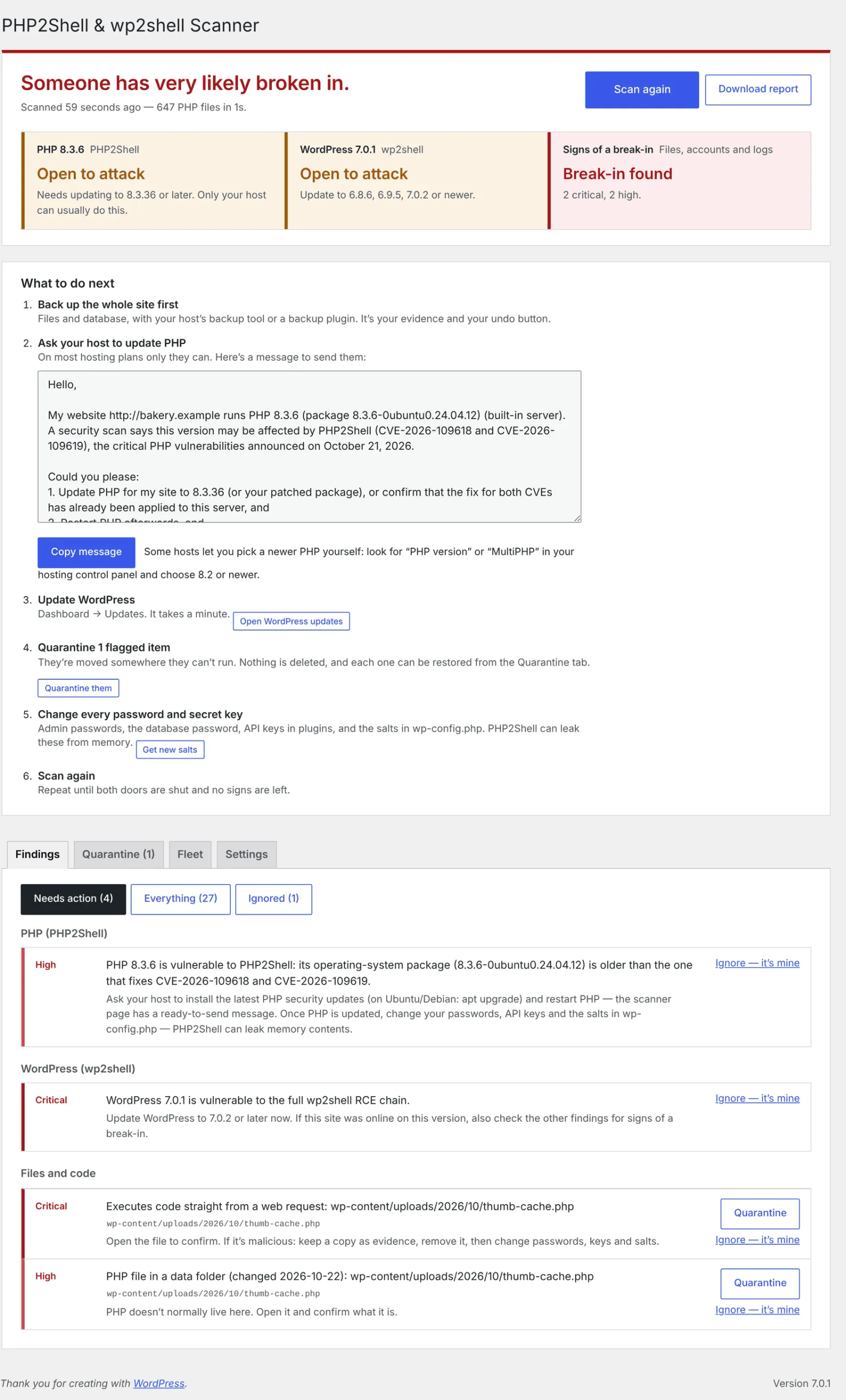
- Are you exposed? Your PHP version, OS package or build date, and WordPress version against the fixed releases, plus whether the site ran an unpatched PHP at any point after October 17.
- Did someone try? PHP error logs for the tell-tale “out of memory … in Unknown on line 0” errors and worker crashes, and (optionally) access logs for bursts of failed uploads, the public exploit tools and successful batch-API requests.
- Did someone get in? Known webshells and the plugin names attackers used, PHP hidden in
uploadsor images, a hidden REST backdoor, new or newly promoted administrators, tampered core files (checked against wordpress.org), code loaded into every page through.user.inior.htaccess, and a second-stage program in/tmp.
It also checks its own files against the official release’s fingerprints, because the first thing a careful attacker does is blind the security tool.
Built not to cry wolf
A scanner that flags everything gets ignored, so false alarms were the thing I worked hardest on. Every release is tested against WordPress core and popular plugins such as WooCommerce, Yoast SEO, Elementor, Jetpack and Contact Form 7, over 16,000 PHP files, and must produce zero High or Critical matches before it can ship.
Real sites still turned up harmless files that looked alarming: WordPress’s own leftover write-test files, files left behind by the WordPress 7.0 update, and the Installatron Worker that IONOS and other hosts use for one-click installs. Each one became a fix within hours, and the changelog lists every one.
Fixing things without making them worse
Scans only read. Nothing changes until you click a button, and every fix can be undone:
- Quarantine moves a flagged file or plugin into a locked folder and renames it so it can never run. Restore puts it back exactly where it was.
- Remove admin rights demotes an unknown administrator and logs them out everywhere. It will never demote you or the last administrator.
- It refuses to touch WordPress core files,
wp-config.phpor a whole theme, and only moves the exact file the scan saw. If that file has changed since, it asks you to scan again.
Fix records and the list of things you choose to ignore are signed with your site’s secret keys, so an attacker who only reaches the database can’t quietly approve their own backdoor.
Scanning a whole fleet of sites
Agencies and hosts can make one site the “hub”. Every other site reports its verdict there after each weekly scan, and the hub shows all of them on one screen, worst first, with email, Slack or Discord alerts when a site gets worse or stops reporting. Members only send their verdict, versions and the text of their most serious findings, never file contents, logs or database data, and every report is signed twice so one compromised site can’t overwrite another’s row.
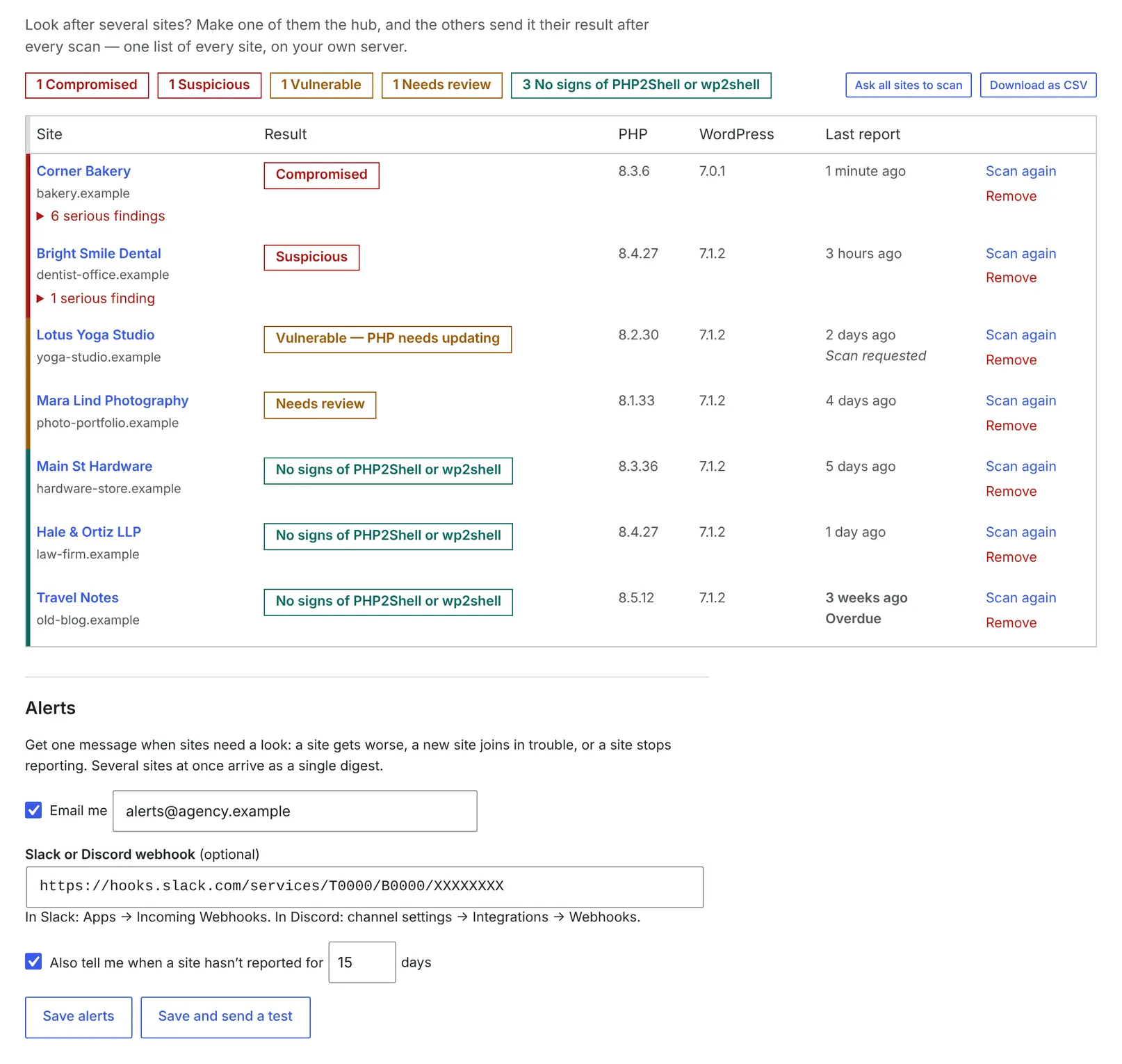
Everything is also available from WP-CLI, so wp @all jat-shell scan checks every site you manage in one command.
What it can’t do
I’d rather you trust it for the right reasons:
- It can’t stop PHP2Shell. Only updating PHP does.
- Memory leaks leave nothing on disk. If you ran an unpatched PHP after October 17, change your passwords, keys and salts even if the scan is clean.
- “No signs” means no known signs. Attackers can rename and rewrite their code.
- It looks for these two attacks specifically. Keep your usual security plugin or host scanner.
How to scan your site
- In WordPress, go to Plugins → Add New Plugin and search for JAT Shell Scanner. It’s listed on WordPress.org.
- Click Install Now, then Activate.
- Open Tools → JAT Shell Scanner and click Scan now.
If your site can’t reach WordPress.org, download jat-shell-scanner.zip instead and upload it under Plugins → Add New Plugin → Upload Plugin.
GitHub repository: github.com/CptNope/JAT-Shell-Scanner. Source code, changelog, issues and every release are there. Suggestions for new indicators are welcome as issues or pull requests.
From then on it scans weekly and emails you only when something new and serious turns up. It updates itself from GitHub through the normal WordPress updates screen. There is no account and nothing is sent to me.
If the scan says your site is compromised, back everything up before deleting anything, then work through the clean-up steps it gives you. I’ve written about what cleaning up a hacked site really involves, and if you’d rather hand it off, that’s what my WordPress hacked site repair service is for.
FAQ
Does updating WordPress protect me from PHP2Shell?
No. PHP2Shell is a flaw in PHP, not WordPress. Your server needs PHP 8.5.12, 8.4.27, 8.3.36 or 8.2.35 or newer, or a distribution package your host confirms is patched.
Is the scanner free?
Yes. It’s MIT-licensed and open source on GitHub, with no account and no data sent anywhere unless you set up your own fleet hub.
Will it change my site?
Not on its own. Scans only read; quarantining a file or demoting an admin happens only when you click the button, and both can be undone.
My site was patched quickly. Do I still need to scan?
Yes, if it ran a vulnerable PHP after October 17 or a vulnerable WordPress after July 17, 2026. Patching closes the door; it doesn’t remove anyone already inside.
Want to keep attackers out in the first place? JAT Site Shield is my free companion plugin for login protection, two-factor and hardening.
Related project
JAT Shell Scanner: the project page, with features and download links.
Worried about your site? See WordPress hacked site repair or security hardening, or book a call.
