
Free WordPress Security Plugin: Login Protection, Two-Factor and Hardening
JAT Site Shield is a free, open-source WordPress security plugin. It locks out brute-force logins, adds two-factor codes, hardens WordPress core, keeps an activity log with email alerts, and checks files against official checksums every day. One plugin, safe defaults, no account and no outside service.
The WordPress.org directory listing is in review. Until it’s approved, download jat-site-shield.zip and use Plugins → Add New → Upload Plugin.
At a glance
| What it is | WordPress security plugin: login protection, two-factor, hardening, activity log, file integrity |
| Price | Free. No paid version, no sign-up, nothing sent to me |
| License | GPLv2 or later |
| Requires | WordPress 6.4+, PHP 7.4 to 8.4 (tested in CI on 7.4 through 8.4) |
| Version | 1.0.0 |
| Built for | Agencies and freelancers who look after many WordPress sites |
| Pairs with | JAT Shell Scanner |
The problem
Locking down a WordPress site usually means stacking several plugins: one for login limits, one for two-factor, one for hardening, one for an audit log, and something else for file checks. Many of them want an account, push a paid tier, or send site data to an outside service. Across many client sites that adds up to a lot of settings to keep in sync and a lot of places for something to be switched off by mistake.
Constraints
- Safe by default: a fresh install should already be meaningfully harder to break into, with nothing to configure first.
- No account, no paid tier, no tracking, and no personal data leaving the site.
- Nothing heavy on page loads. Background work has to run in small steps so large sites don’t time out.
- A way back in. Anyone who locks themselves out needs a documented recovery path.
- Work behind Cloudflare without trusting a header anyone could fake.
What it does
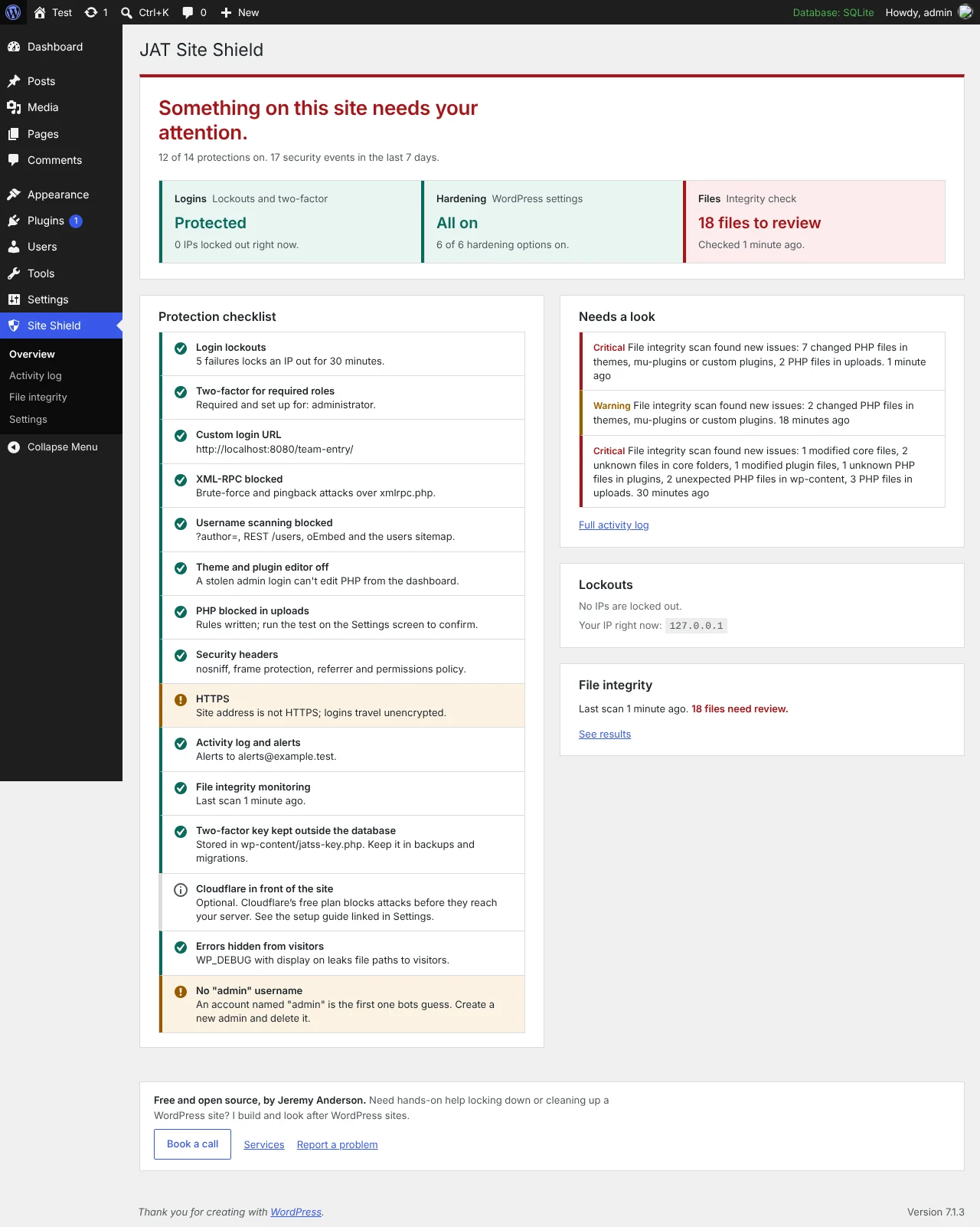
- Login protection: IP lockouts after repeated failed logins (5 in 15 minutes by default), with a 24-hour lockout for repeat offenders and IPv6 grouped by /64. Login and reset forms give the same answer whether or not an account exists. Optional custom login address and an office-IP allowlist.
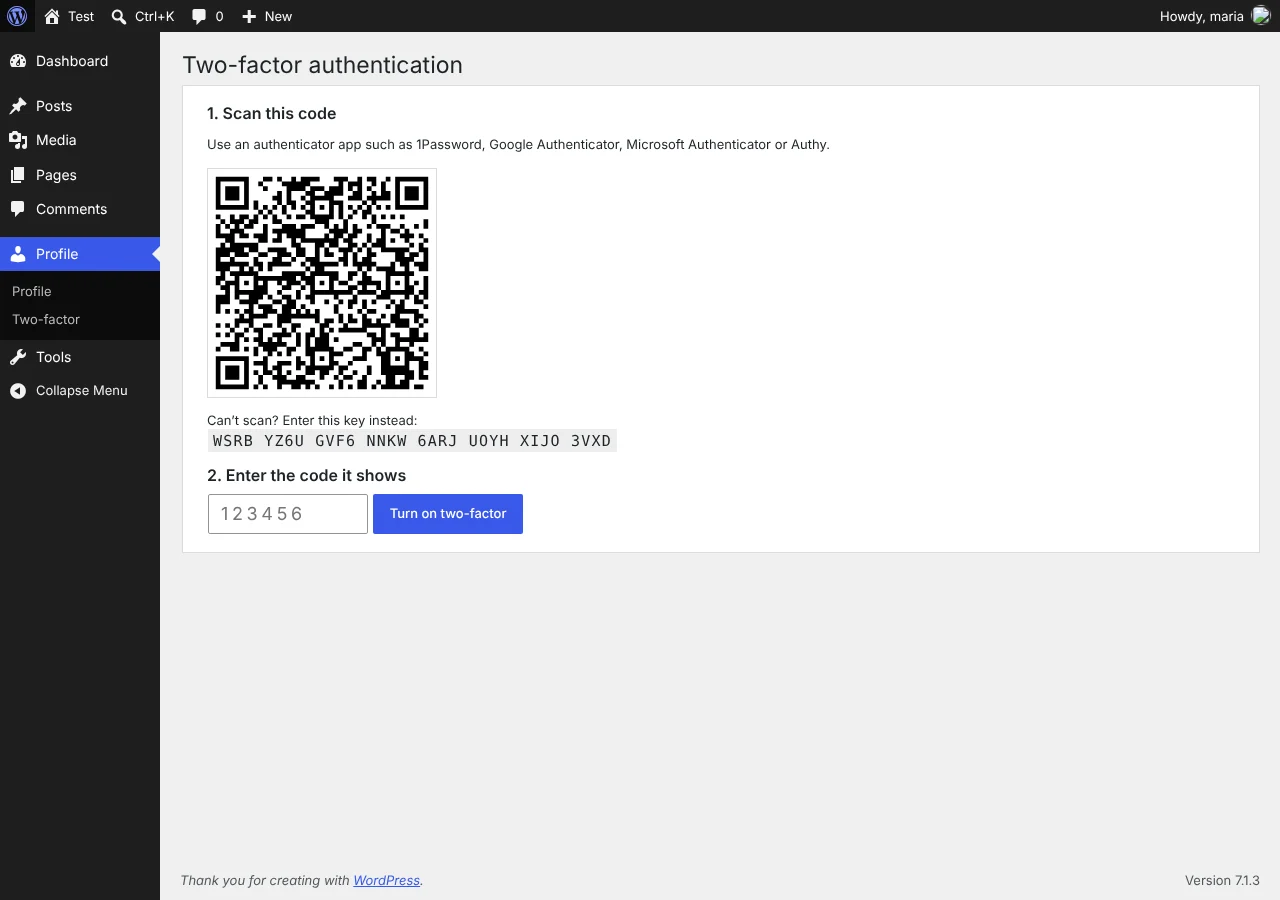
- Two-factor: six-digit codes from any authenticator app plus 10 single-use backup codes, required by role (administrators by default).
- Hardening: blocks XML-RPC (kept on when Jetpack needs it), username scanning, the file editor and PHP in uploads, with a live test. Security headers, version hiding, optional HSTS.
- Activity log and alerts: logins, lockouts, two-factor events, user and role changes, plugin, theme and core updates, and key settings changes. Filter, search, CSV export, and email alerts capped at 10 an hour.
- File integrity: a daily scan of core and WordPress.org plugins against official checksums, and of everything else against the previous scan. Flags modified files, unknown PHP and PHP in uploads.
- Checklist: catches common mistakes such as no HTTPS, Cloudflare’s Flexible SSL, an
adminusername,WP_DEBUGshowing errors and WP-Cron turned off.
How it’s built
Every event goes through one logging function, which fires the jatss_event_logged action. Email alerts hang off that, and anyone can hook the same action to send events to their own monitoring system. Events are graded critical, warning, notice or info, and only critical events are emailed by default.
- Two-factor codes follow RFC 6238. Backup codes are stored as hashes, codes can’t be replayed, and attempts are locked per user so parallel requests can’t get around the limits.
- Session checks: every login session records that it passed two-factor. A session created without the code step, for example by a plugin that sets the login cookie directly, is ended and logged as critical.
- Encrypted secrets: two-factor secrets are encrypted with a dedicated key in
wp-content/jatss-key.phpor aJATSS_SECRET_KEYconstant, so rotating the WordPress salts doesn’t break them. A missing key refuses the login rather than skipping two-factor. - Cloudflare: detected automatically, and the visitor IP header is only trusted when the request really comes from Cloudflare’s network.
- Lockout cost: while an IP is locked out, password checks are skipped entirely, so attacks cost the server less.
- Developer tools: WP-CLI commands (
wp jat-shield status,login-url,lockouts,unlock,reset-2fa,scan,log), a safe-mode constant for lockouts, and multisite support.
Privacy
The only outside requests go to WordPress.org during the file scan, to download official checksums. They send the WordPress version and site language, and each plugin’s slug and version. No personal data is sent, and plugin checksums can be turned off in settings.
Limits
- Logins over the REST API (JWT plugins) aren’t supported for users with two-factor; use application passwords.
- Lockouts are stored as transients, so sites on several servers need a shared object cache for lockouts to apply everywhere.
- The file check runs on WP-Cron, so quiet sites need a server cron job.
- PHP-in-uploads blocking is written as
.htaccess. On nginx, the host has to block it.
What’s next
Version 1.1 is planned to add opt-in vulnerability alerts for installed plugins and themes, security-only automatic updates, and a fresh two-factor check before dangerous actions such as installing a plugin or creating an administrator. Passkeys and a breached-password check are planned after that. The full plan is in the roadmap.
Read the launch post
For a plain-language walkthrough, install steps and FAQ, read JAT Site Shield: a free WordPress security plugin with two-factor and login protection. Need a site locked down or cleaned up for you? See WordPress hardening, hacked site repair, or book a call.