
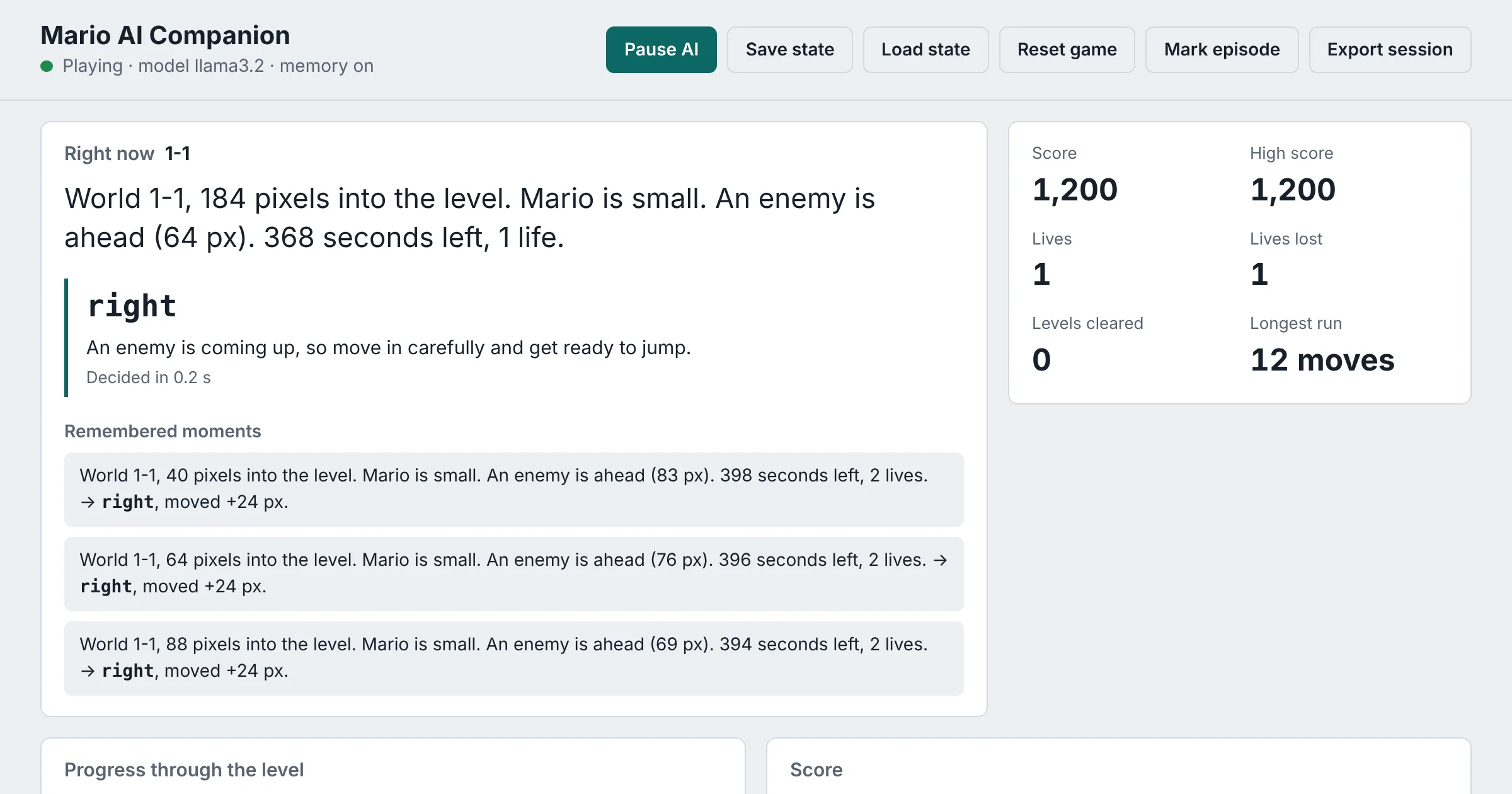
An AI can play Super Mario Bros. on your own computer: RetroArch runs the game, a Python script reads Mario’s position, power-up, lives and nearby enemies straight from the console’s memory, a local model in Ollama picks each move, and a live AI-powered Mario dashboard shows what it saw, what it chose and why, plus stats and achievements. It also remembers past situations and what happened after each move, and uses those memories in later decisions.
This is the rebuilt version of my AI-powered Mario dashboard project, first published in 2025. The code is free and open source on GitHub: CptNope/game_ai_rag_reproach_livechat.
What changed in this version
The original was a prototype that never fully ran: it tried to read the game’s memory from a save file Super Mario Bros. doesn’t have, and it depended on a retrieval library that doesn’t exist. Version 2 keeps the same idea and features and makes them work:
- Live memory reads through RetroArch’s own network commands, using a documented memory map of the game.
- Moves as structured JSON from Ollama, so the model always picks a valid action and says why.
- Real retrieval-augmented memory built on Ollama embeddings.
- A rebuilt dashboard with live state, charts, achievements, per-level stats and controls.
- 23 automated tests that run against a fake game, so the logic is checked without an emulator.
What the AI-powered Mario dashboard shows
- Right now: the situation in plain English, the move the AI chose, its one-sentence reason and how long it took to decide.
- Remembered moments: the past situations most like this one, the move made each time and what happened next.
- Stats: score, high score, lives, lives lost, levels cleared and the longest run without dying.
- Charts of progress through the level and score over time.
- Eight achievements, such as getting a Super Mushroom, clearing a level or getting back up after losing a life, with a pop-up when one unlocks.
- Levels: attempts, clears and the furthest point reached on each level.
- Controls: pause and resume the AI, save and load a state, reset the game, mark an episode and export the session.
The featured image above shows the dashboard during a test run.
How it works
1. Read the game from memory
RetroArch can answer commands over the network. With Network Commands turned on, READ_CORE_MEMORY returns bytes from the running game’s RAM over UDP on port 55355:
def read_memory(self, address: int, length: int) -> bytes:
    """Read bytes from the running game's system RAM."""
    reply = self._send("READ_CORE_MEMORY %x %d" % (address, length), expect_reply=True)
    parts = reply.split()
    if len(parts) < 3 or parts[0] != "READ_CORE_MEMORY":
        raise RetroArchError("Unexpected reply from RetroArch: %r" % reply[:80])
    if parts[2] == "-1":
        raise RetroArchError("RetroArch couldn't read memory: %s" % (" ".join(parts[3:]) or "unknown error"))
    values = bytes(int(b, 16) for b in parts[2:])
    if len(values) != length:
        raise RetroArchError("RetroArch returned %d bytes, expected %d" % (len(values), length))
    return values
According to the Data Crystal RAM map for Super Mario Bros., Mario’s position is a page number (0x006D) times 256 plus his position on screen (0x0086), the power-up is at 0x0756, lives at 0x075A, the world and level at 0x075F and 0x0760, and the score is six decimal digits starting at 0x07DD. Five enemy slots say whether each enemy is on screen and where.
2. Turn numbers into a sentence
Language models reason better about words than raw bytes, so each reading becomes a short description:
World 1-1, 280 pixels into the level. Mario is big. An enemy is right in front of Mario (20 px). 380 seconds left, 2 lives.3. Remember similar moments (RAG)
Every situation is turned into an embedding with Ollama’s nomic-embed-text model and saved with the move that was made and what happened next. Before each decision, the most similar past moments are found by cosine similarity:
def recall(self, vector: Optional[List[float]], top_k: int = 3) -> List[dict]:
    if vector is None or not self.items:
        return []
    scored = sorted(self.items, key=lambda item: cosine(vector, item["vector"]), reverse=True)
    return [{k: v for k, v in item.items() if k != "vector"} for item in scored[:top_k]]


def cosine(a: List[float], b: List[float]) -> float:
    if len(a) != len(b):
        return -1.0
    dot = sum(x * y for x, y in zip(a, b))
    norm = math.sqrt(sum(x * x for x in a)) * math.sqrt(sum(y * y for y in b))
    return dot / norm if norm else -1.0
Those memories go into the prompt, for example: “An enemy is right in front of Mario → did right, Mario lost a life.” Over time, the model sees which moves worked in situations like the current one. It’s the same retrieval-augmented generation idea behind my RAG AI Specialist, applied to a game.
4. Choose a move as structured JSON
The model must answer with one of seven moves and a reason. Passing a JSON schema in Ollama’s format field (structured outputs) keeps every reply valid:
SCHEMA = {
    "type": "object",
    "properties": {
        "action": {"type": "string", "enum": list(ACTIONS)},
        "reason": {"type": "string"},
    },
    "required": ["action", "reason"],
}
If a reply still can’t be used, Mario keeps running right instead of the script crashing. By default RetroArch is paused while the model thinks, so even a slow model on a laptop plays fairly.
5. Press the buttons and learn
RetroArch’s network commands can save, load, pause and reset, but they can’t press game buttons, so moves are sent as key presses to the RetroArch window with RetroArch’s default player 1 keys: arrows to move, X to jump, Z to run. After each move, the game is read again, the result (“moved +24 px and scored 50”, “Mario lost a life”) is saved to memory, and the achievements and stats update.
Set it up
- Install RetroArch with an NES core such as FCEUmm, Nestopia or Mesen, and load your own legally obtained copy of Super Mario Bros. No game files are included.
- Turn on Network Commands in RetroArch under Settings, then Network, using port 55355.
- Install Ollama and pull the two models:
ollama pull llama3.2
ollama pull nomic-embed-text
Then get the code and start it:
git clone https://github.com/CptNope/game_ai_rag_reproach_livechat
cd game_ai_rag_reproach_livechat
python -m venv venv
source venv/bin/activate   # Windows: venv\Scripts\activate
pip install -r requirements.txt
python -m mario_ai
Open http://localhost:5000 for the dashboard, then click back into the RetroArch window so it receives the key presses. Everything is configured with environment variables:
| Variable | Default | What it does |
|---|---|---|
OLLAMA_MODEL | llama3.2 | Model that chooses moves |
OLLAMA_EMBED_MODEL | nomic-embed-text | Model that embeds situations for memory |
THINK_PAUSED | 1 | Pause the game while the model thinks (0 plays in real time) |
HOLD_TIME | 0.35 | Seconds each move’s keys are held |
CAPTURE_FRAMES | 0 | 1 shows screen captures on the dashboard |
The dashboard has no login, so it only listens on your own computer by default.
What to expect
A general-purpose language model choosing one move at a time is not a strong Mario player. It reacts to a short description, not the screen, and the memory addresses it reads don’t include pipes, gaps or blocks, so it can’t see most obstacles. That’s what makes it interesting to watch: you can see exactly how the model reasons, how its memories change its choices, and where it goes wrong. For a stronger player, the next steps would be reading the level layout from memory, giving a vision model the screen, or fine-tuning a small model on the moves that worked. Every decision is saved to decisions.jsonl for exactly that.
If something doesn’t work
- “No reply from RetroArch”: Network Commands are off, or RetroArch is using another port.
- “No memory map defined”: try another NES core.
- Mario doesn’t move: click the RetroArch window so it has keyboard focus, and check the keys are RetroArch’s defaults.
- “Memory is off”: pull the embedding model with
ollama pull nomic-embed-text.
FAQ
Can an AI play Super Mario Bros.?
Yes. This project uses a general language model that reasons about each situation, which is easy to follow but not very skilled. Reinforcement learning agents trained for many hours on the game can play much better, but you can’t read their reasoning the way you can here.
Do I need a GPU?
No. Small models like Llama 3.2 run on a regular computer’s CPU, and the game pauses while the model thinks, so speed only changes how long a run takes.
Is the game included?
No. You need your own legally obtained copy of Super Mario Bros. and RetroArch. The project only reads the game’s memory and presses keys.
How does RAG help a game AI?
Retrieval-augmented generation gives the model relevant facts at the moment it decides. Here the facts are its own past experience: similar moments, the move it made and the result, so it can avoid repeating a move that cost a life.
Where is the source code?
On GitHub at CptNope/game_ai_rag_reproach_livechat, under the MIT license. Super Mario Bros. is a trademark of Nintendo, and this project isn’t affiliated with Nintendo.
Want a custom AI tool or dashboard built? See AI systems and consulting, or book a free 30-minute call.
Related reading: Build Your Own AI-Powered Web App with Ollama and Flask · Vibe Coding a Babylon.js Survival Game with Windsurf
